
 Try
each operation listed below. Then confirm the machine's
response, using a flashlight to view the star projector to
identify the star projector components/motions as they are used.
Instead of flashlights, you may use the Goto Spotlights controlled
with the lighting panel; labelled SGS and NGS.
NOTE: For all star projector dimmer control knobs that fade projector lamps up and down, clockwise rotation (to the right) increases brightness, while counterclockwise rotation (to the left) decreases brightness. Setting the knob as far to the left as possible turns the projector off.
|
|
|
|
|
|
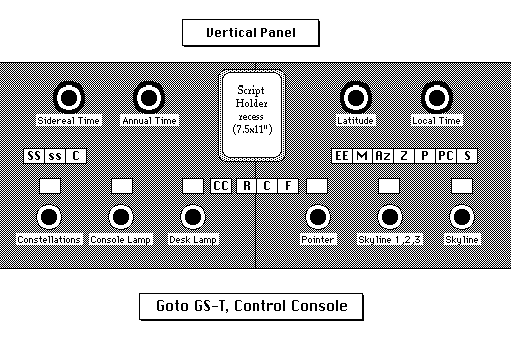
right side (EE on diagram) |
|
|
The "on" switch illuminates the ecliptic and equatorial coordinates together, the "off" switch cuts them off. |
|
right side (M on diagram) |
|
|
None |
|
right side (Az on diagram) |
|
|
None |
|
right side (Z on diagram) |
|
|
None |
|
3rd from right |
|
|
The north polar point is represented by a red arrow, the south polar point by a green arrow. |
|
2nd from right |
and Galactic Pole |
|
None |
|
|
|
|
When changing latitude, the north & south, and east & west directions will reverse when either the north or south poles pass the zenith. If a polar point passes through the zenith, click the NORTH or SOUTH buttons to display the cardinal points accordingly, as either red or green abbreviations, corresponding to whether the north point is in the true north and the south point is in the true south (use red), or whether the north point is in the true south and the south point is in the true north (use green). |
|
3rd from left |
|
|
1. The dimmer control knob for the red lights along the left and right sides of the Script Holder Recess. 2. To avoid any detrimental effect to the show, keep the light level as dark as possible. Keep off when not in use. |
|
3rd from right |
|
|
1. The on/off switch is on the pointer itself. 2. Adjust the brightness by turning the panel dimmer control knob. 3. Do not turn the dimmer control knob for the pointers off when shutting down. |
 ©1997
Welcome to the Planetarium web site provided by the OBU Planetarium. These pages have been written by the Planetarium Director, Kerry Magruder; the Unified Studies Natural Science Coordinator, Mike Keas; other OBU faculty; and the students who work in the planetarium.
These web pages may be printed, copied, and distributed for educational use by any non-profit educational group so long as they are not edited or altered in any way, nor distributed for profit, nor repackaged or incorporated into any other medium or product, and so long as full credit is given to the OBU Planetarium.
This page and many others from the same web site may be accessed from the OBU Planetarium Home Page.


Our web pages are never finished, but always under construction! The formatting of our web pages may be unintelligible if you are not using Netscape 2.0+. If you find a link that does not work, please tell us which link does not work--and which page you are on. Contact us by Email with general inquiries or suggestions. Thank you.
 Page made with HyperNote
and Claris Home Page
Kerry Magruder, Planetarium Director, Home
page or Email
Mike Keas, Unified Studies Natural Sciences Coordinator,
Home page
 General
OBU Home Page