
 Most
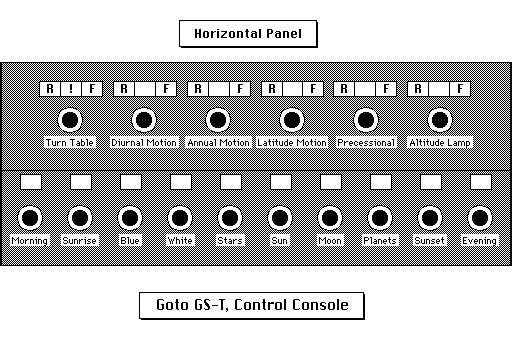
motions are controlled by a speed-control knob. Above each
knob is a lighted indicator label. To the left of the lighted
label is a Reverse Direction switch; to the right of the label
is a Forward Direction switch. Note the following points about
the operation of these knobs and direction switches:
|
(Horizontal Panel) |
|
|
Caution |
|
far left |
|
|
The turntable moves a maximum of about one and one quarter turns in either direction from the Home direction. |
|
|
|
|
1. Select either Forward or Reverse of the Latitude Change switch, turn the knob to OFF. 2. Next push the Turntable Reset button. The projector will automatically return to the preset Home position and stop. CAUTION : If the speed-control knob is not in the OFF position when the Turntable Reset button is pressed, the machine will not stop automatically but will instead continue rotating. CAUTION: If the turntable has been moved more than one complete turn away from its Home position, the Reset button will not return it to true Home, but only to a position aligned with Home even if it is precisely one turn away from Home. |
|
2nd from left |
|
|
Forward direction is defined as the ordinary westward motion that the sun and stars appear to follow daily across the sky. |
|
middle area beneath Script Holder Recess (CC on diagram) |
|
|
1. When the switch is ON (engaging the diurnal / annual coupling device), the Diurnal Motion switch and knob (Horizontal Panel, top row, 2nd from right) activate this feature. In this mode, as one day turns one rotation with diurnal motion, the position of the Sun, Moon and five planets also move forward by a day. 2. When the switch is OFF (disengaging the diurnal /annual coupling device), the Diurnal Motion switch and knob deactivate this feature. In this mode, even if diurnal motion turns through one day, the Sun, Moon and five planets will not move, but rather, will remain fixed in their original positions. |
|
3rd from left |
|
|
Forward direction is defined as the direction of the Sun's annual motion, or the slow eastward "falling behind" of the Sun against the background of the fixed stars. |
|
3rd from right |
|
|
1. Forward direction is defined as the north polar point moving along the meridian from north to 90° (zenith) to south. 2. Note that "latitude" pertains to the position of the earth-bound observer, not to the stars. This motion, swinging the celestial equator higher or lower above the horizon, allows stars of different declination to be viewed. (The axis of motion for celestial latitudes would swing along the ecliptic, not the celestial equator.) |
|
2nd from right |
|
26,000 year cycle. |
1. Forward direction is defined as movement from the past or the present towards the future. Reverse is defined as movement from the present or future into the past. 2. In order to see precessional motion, illuminate the Precession Circle (Horizontal Panel, middle row, 3rd from left). The "+" direction on the grid is the future, the "-" direction is the past. Warning: Do not run diurnal motion when the Precession is set more than two or three thousands of years away from the present. Precession changes the orientation of bright star projectors on the machine, which may not clear the star projector supports at extreme precessional positions. |
|
far right |
|
|
1. Turn the Altitude coordinate lamp on with the central button (between the R and F switches). 2. Set the direction of motion with the Reverse or Forward switch. 3. Finally, adjust the speed with the speed- control knob. |
NOTE: If motion in a reverse direction is necessary, always overshoot in the reverse direction and come back with forward motion. Because of the way the gear teeth come into contact, the last motion on any axis should be in the forward direction. This will provide finer and more responsive control when motion is resumed, and increase the longevity of the projector.
 ©1997
Welcome to the Planetarium web site provided by the OBU Planetarium. These pages have been written by the Planetarium Director, Kerry Magruder; the Unified Studies Natural Science Coordinator, Mike Keas; other OBU faculty; and the students who work in the planetarium.
These web pages may be printed, copied, and distributed for educational use by any non-profit educational group so long as they are not edited or altered in any way, nor distributed for profit, nor repackaged or incorporated into any other medium or product, and so long as full credit is given to the OBU Planetarium.
This page and many others from the same web site may be accessed from the OBU Planetarium Home Page.


Our web pages are never finished, but always under construction! The formatting of our web pages may be unintelligible if you are not using Netscape 2.0+. If you find a link that does not work, please tell us which link does not work--and which page you are on. Contact us by Email with general inquiries or suggestions. Thank you.
 Page made with HyperNote
and Claris Home Page
Kerry Magruder, Planetarium Director, Home
page or Email
Mike Keas, Unified Studies Natural Sciences Coordinator,
Home page
 General
OBU Home Page